

Joker Visa has been the most popular prepaid credit card for Canadians for the past two years (according to search interest on Google Trends). Joker Visa’s are very easily accessible with a wide variety of retail outlets across Canada selling them in-store including Canadian Tire, Loblaws, Rexall, Shoppers Drug Mart, Staples, Quickie, and many more locations.
Joker Visa is a simple way to add money to your online sportsbook account. Below I will recommend an online sportsbook serving Canadians that we’ve tested to accept Joker Visa deposits, and provide an easy guide to walk you through setting up a sports betting account, depositing the Joker Visa card, and place your bet.
What Canada Betting Sites Accept Joker Visa

Joker Visa cards are the most popular prepaid credit card in Canada, but that doesn’t guarantee that every Canadian sportsbook will accept the deposit method. I’ve found the acceptance rate can be hit and miss for Joker Visa cards across Canadian sportsbooks. From my tests, SportsInteraction.com is the best option for Canadians looking to deposit into their betting account with a Joker Prepaid Visa.
I tested a Joker Visa deposit at the following Canadian sportsbooks (test dates outlined below):
- Bet365: Not Accepted (tested April 2026)
- Betway: Funds Added Instantly (tested April 2026)
- DraftKings: Not Accepted (tested April 2026)
- PointsBet: Not Accepted (tested April 2026)
- Sports Interaction: Funds Added Instantly (tested April 2026)
- theScore Bet: Not Accepted (tested April 2026)
**It’s interesting to note that Sports Interaction failed our Joker MasterCard deposit test in April of 2026, so Joker Visa vs Joker MasterCard seem to be accepted at different rates.
How To Bet Online Using Joker Visa – 3 Step Guide
Follow this three step tutorial to fund your sports betting account with your Joker Visa prepaid card.
Step 1. Open SportsInteraction.com Account
Click the above link and select ‘Register’ on the landing page. Complete the registration form to open your SIA account.
Step 2. Deposit Using Joker Visa
After logging into your Sports Interaction account click the ‘Deposit’ button in the top right corner of the screen.
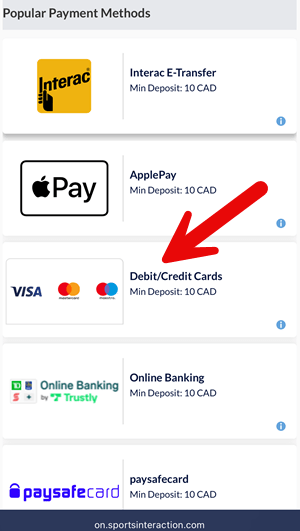
Select ‘All Options’ and select ‘Debit/Credit Cards’ under the Popular Payment Methods header to proceed to the Visa deposit page.
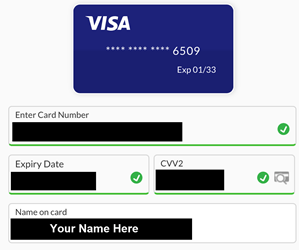
Enter the Joker Visa information on the credit card payment page. Enter the card number, expiry date, bank name, and CVV2 number. For the ‘Name on card’ field use your own name.
On the following page you will enter your deposit amount in Canadian Dollars, including the CVV2 again, and click ‘Deposit’ to add the Joker Visa amount to your Sports Interaction account.
**Sports Interaction implements a $250 maximum weekly spend from prepaid credit cards.
Step 3. Place Your Wagers
Your Joker Visa funds should immediately be added to your account and available for use. You can now select ‘Sports’ from the top navigation bar and select the betting market you want to wager on. Click the odds of the bet you want to make to add it to your Bet Slip, enter your Stake amount, and click ‘Place Bets’ to lock in your bet.
You will be able to withdraw any winnings directly to your bank account using the Interac e-Transfer method.
Ready to fund your betting account using a Joker Visa? Click here to visit SportsInteraction.com.