Apple Pay has become one of the quickest ways to fund an online betting account in Canada. If your Visa, Mastercard or debit card is already in your Apple Wallet, you can deposit in a couple of taps without ever typing in a card number.
Both of our top rated sportsbooks accept Apple Pay deposits across Canada. Below I’ll walk you through how it works, what you need to get started, and how to cash out your winnings, since Apple Pay can’t be used for withdrawals.
My top pick is SportsInteraction.com, which is licensed by iGaming Ontario and Alberta iGaming Corporation to operate in the regulated Ontario and Alberta betting markets, while also accepting players from the rest of Canada. Apple Pay is available in the Sports Interaction cashier in every province, with no deposit fees.
Bet365 also accepts Apple Pay across Canada, with deposits from $10 up to $50,000.
What You Need to Use Apple Pay
A supported iPhone, iPad or Apple Watch.
A Visa, Mastercard or debit card added to your Apple Wallet. Your bank has to approve the card for Apple Pay.
The sportsbook’s app, or the Safari browser if you’re betting on the mobile site.
At Bet365, the name on your card must match the name on your betting account.
Apple Pay Deposit Guide
How to Deposit with Apple Pay at Sports Interaction
Log in to your SportsInteraction.com account, open the Cashier and select ‘Deposit’.
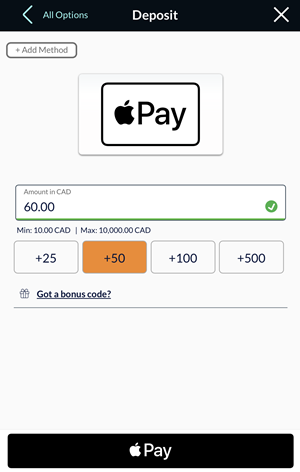
Click the Apple Pay logo and enter your deposit amount.
Click the ApplePay button and confirm the deposit through your Apple Pay wallet on your Apple device. To use a different card from your Wallet, click ‘Change Payment Method’ and select the card you want to use.
Confirm the payment with Face ID, Touch ID or your passcode.
You’ll see a confirmation with your deposit amount and transaction ID, and the funds are credited to your account right away.
Depositing with Apple Pay at Bet365
At Bet365, choose Apple Pay in the deposit section, enter your amount and confirm with Face ID, Touch ID or your passcode. Deposits are instant, with a $10 minimum and $50,000 maximum. Just make sure the card in your Wallet is in your own name, as Bet365 requires it to match your account.
If you bet from your phone, Apple Pay is hard to beat. There’s no card number to type in and nothing to fill out, so you can top up your account in a few seconds right before puck drop.
Apple Pay Withdrawals
Apple Pay can only be used for deposits at Canadian sportsbooks. When it’s time to cash out, you’ll need to use another method.
At Sports Interaction, most bettors withdraw with Interac e-Transfer, which is free and usually the fastest option. Bet365 sends withdrawals for Apple Pay deposits by bank transfer.
Before your first withdrawal is processed, you will likely have to confirm your identity by providing the sportsbook with a government issued ID (such as a driver’s licence) and proof of address (a phone bill, hydro bill, bank statement, etc.).
Apple Pay Betting FAQ
Which Canadian sportsbooks accept Apple Pay?
Sports Interaction and Bet365 both accept Apple Pay deposits across Canada.
Are there fees for depositing with Apple Pay?
Sports Interaction doesn’t charge a fee for Apple Pay deposits. Your card issuer may still treat the transaction as a cash advance if you use a credit card, so check your card terms.
Can I withdraw my winnings to Apple Pay?
No. Apple Pay is deposit-only at Canadian sportsbooks. Sports Interaction bettors usually cash out with Interac e-Transfer, while Bet365 pays out by bank transfer.
Can I use Apple Pay on Android or Windows?
No, Apple Pay only works on Apple devices. Android users can use Google Pay at Bet365, or deposit directly with a Visa, Mastercard or Interac e-Transfer.


 See Website For Details
 #Ad
#Ad